A product of Adoneinu

Free Markdown to PDF, DOCX, and HTML Converter

Paste or upload Markdown, preview it instantly, choose a theme, and export in seconds — no signup, no install, no Pandoc required.

✅ Free forever 🔄 Unlimited conversions 🔒 Private & secure

Live preview - 30 themes - Private by design

How it works

Upload or paste Markdown

Preview with your preferred theme

Export to PDF, DOCX, or HTML

Upload and preview in seconds

No signup required. Drop a Markdown file, paste content, or load our sample demo.

Drag & drop your Markdown file here
or click to browse

📦 Maximum file size: 10 MB

💡 For files over 5 MB with many images, consider splitting your document or using our REST API for better performance.

.md .markdown .txt HTML / DOCX / PDF
or

Instantly preview all 30 themes with a pre-written demo

See Markdown Converter Workspace in action

From upload to export — a polished workflow built for writers, teams, and publishers.

Live preview
Markdown Converter Workspace live document preview with device frames
Preview

Live preview with device frames

Centered canvas, desktop/tablet/mobile views, and zoom — see every change instantly.
Themes
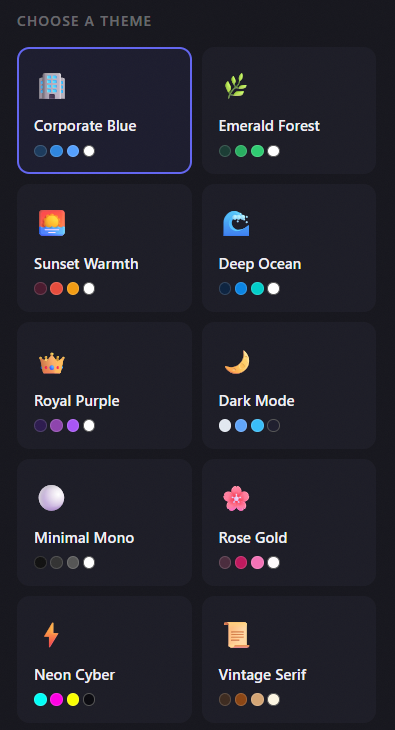
Theme picker with 30 professional styles
30 themes

Pick a look in one click

Corporate, neon, vintage, arctic frost, and more — switch themes without re-uploading.

Customize
Typography and color customization panel
Customize

Fine-tune every detail

Google Fonts, color pickers, table presets, and spacing controls with live feedback.
Export
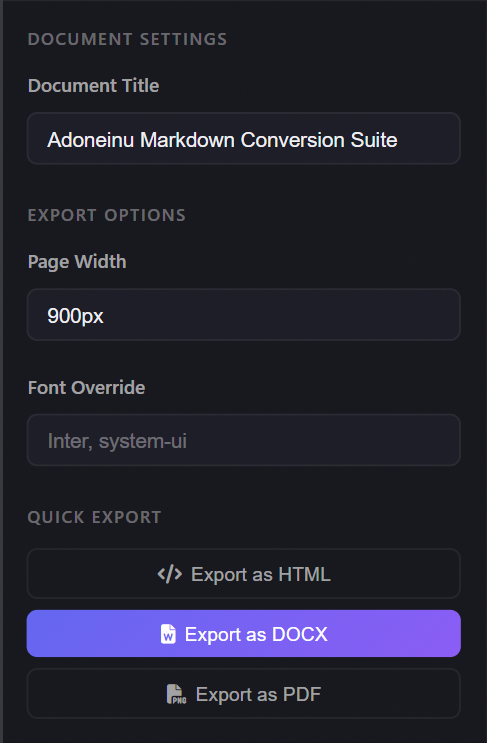
Export to HTML, DOCX, and PDF
Export

One-click multi-format export

Download styled HTML, standard DOCX with hyperlinks, or print-ready PDF.

Why use this converter

Live preview while you edit

See your document formatting as you write, not just after export.

One-click export to PDF, DOCX, and HTML

Get polished output without installing anything.

30 ready-to-use document themes

Choose professional styles for reports, blogs, notes, and more.

Batch conversion for multiple files

Convert many Markdown files at once from your browser.

No signup, no install, no terminal

Start converting immediately in the browser.

Privacy-focused processing

Your documents are not stored for normal use.

What you get

Live document preview

Export to PDF, DOCX, and HTML

30+ professional document themes

Batch conversion for multiple files

REST API and MCP server for automation

Free forever for basic use

For developers and automation

Use the free REST API or MCP server to convert Markdown in CI/CD pipelines, internal tools, or AI-assisted workflows.

API & automation

Convert Markdown programmatically using our free REST API.

  • Simple JSON-based API
  • Works with any language or framework
  • Batch conversion endpoint available
  • Docs and examples in the API docs page
📖 API Docs

MCP Server

Connect with AI assistants to convert Markdown directly from your chat interface.

  • MCP support for Claude Desktop and VS Code
  • Batch processing for automation workflows
  • Optional machine fingerprinting for stricter environments
📖 MCP Docs

Export to any format

HTML
DOCX
PDF
Clipboard

Privacy & security

Your documents are used only for conversion and are not stored on our servers for normal use. We do not sell or share your documents.

Processed safely

Documents are processed in the browser or on the server and not saved for normal use.

No tracking

No account, no tracking, no data sold.

Fair use

Size limits apply (up to 10 MB per file) to keep the service stable.

Common questions

Is this really free?

Yes. Basic conversion is free forever. No signup, no hidden fees.

How do I convert Markdown to PDF?

Upload or paste your Markdown, choose a theme, then click PDF export.

How do I convert Markdown to Word?

Use the DOCX export option to get a Word-compatible document.

Can I use it without Pandoc?

Yes. This tool runs in the browser and does not require any terminal or Pandoc installation.

Is my data stored?

No. Your documents are used only for conversion and are not stored for normal use.

Can I convert multiple files at once?

Yes. Use batch conversion to process multiple Markdown files in one go.

Markdown Converter Workspace v2.1

The latest release bringing API access and AI assistant integration.

v2.2 — Document Features

  • Document Structure Options — Auto-generate Table of Contents, number headings, add cover pages, and show word count
  • Citation Support — BibTeX integration for academic references with automatic citation processing
  • PDF Chrome — Custom headers, footers with page numbers, watermarks, and margin controls
  • Link Rewriting — Convert .md links to .html, .pdf, or .docx for published documents
  • Enhanced Preview — New Document panel with all structure and formatting options in one place

v2.1 — REST API & MCP Server

  • REST API v1 — Programmatic access with endpoints for themes, convert, file upload, and batch processing
  • Free API keys — Secure authentication with SHA-256 hash validation
  • MCP Server — Native integration with AI assistants like Claude Desktop and VS Code
  • Fair usage validation — Machine fingerprinting
  • Developer Documentation — Comprehensive API and MCP documentation at /docs/api and /docs/mcp
  • New Navigation — Quick access to API and MCP docs from the main navigation

v2.0 — Themes, PDF & batch

  • 30 professional themes plus custom colors and typography
  • 20+ Google Fonts with separate heading and body controls
  • Print-ready PDF export alongside HTML and DOCX
  • Batch convert: multi-file upload, tile preview, ZIP download
  • Standard DOCX export with native hyperlinks
  • Redesigned landing page, FAQ, and product tour sections

v1.5 — Live preview refresh

  • Split-pane preview with device frames and zoom
  • Improved table and code-block styling across themes
  • Faster upload → preview pipeline

v1.0 — Launch

  • Markdown to styled HTML and DOCX
  • Core theme set and drag-and-drop upload
  • Hosted at md.adoneinu.com under Adoneinu